

I once assumed strong passwords kept accounts secure.
But the data shows otherwise. According to the Cybersecurity and Infrastructure Security Agency (CISA), 90% of all cyber incidents begin with phishing, where attackers can trick users into revealing credentials or interacting with malicious links and attachments.
This is where Two-Factor Authentication (2FA) adds another layer of protection. But enabling 2FA isn’t enough. It needs to be tested to ensure every authentication path works reliably and fails securely.
Issues such as delayed OTPs, broken push prompts on older devices, non-expiring backup codes, and drifting TOTP tokens can create security gaps or prevent legitimate users from logging in. The takeaway is simple: 2FA works only when its authentication flows and edge cases are tested carefully.
This guide explains how to test 2FA, including common mechanisms, test scenarios, edge cases, and best practices.
What is Two Factor Authentication (2FA)?
Two-Factor Authentication (2FA) is an authentication method that requires users to verify their identity using two factors before gaining access to an account or protected functionality.
The first factor is typically a username and password. The second factor can be an OTP, authenticator app code, push notification, biometric verification, hardware token, or backup code.
The purpose of 2FA is to add another verification step when a password alone is not sufficient to establish the user’s identity.
For testers, this means authentication is no longer a single login interaction. Each additional factor introduces another flow that needs to be validated.
Example of Two-Factor Authentication
For example, a typical 2FA login flow may look like this:
- The user enters their username and password.
- The application validates the primary credentials.
- The application requests a second authentication factor.
- The user enters an OTP, approves a push notification, provides a biometric input, or uses another configured factor.
- The application validates the second factor.
- The user is granted access only when the required authentication conditions are satisfied.
A test should therefore validate not only the successful path but also what happens when any of these steps fails.
Types of Authentication Factors
Authentication factors fall into three main categories, each verifying identity in a different way. Strong security often comes from combining factors from more than one category.
- Knowledge factor (Something you know): Includes passwords, PINs, and security questions that rely on user knowledge.
- Possession factor (Something you have): Covers physical or digital items such as SMS/email OTPs, authenticator app codes, hardware tokens, or smart cards.
- Inherence factor (Something you are): Uses biometric traits like fingerprints, face recognition, voice ID, or iris scans for verification.
How does Two-Factor Authentication Work?
A typical 2FA authentication flow consists of the following steps:

1. The user enters primary credentials.
The user enters a username, email address, phone number, and password, depending on the application’s login design.
Test: Verify that valid credentials move the user to the second authentication step and invalid credentials are rejected.
2. The application requests the second factor.
After validating the primary credentials, the application triggers the configured 2FA mechanism.
This could be an SMS OTP, email OTP, TOTP, push notification, biometric prompt, or hardware token.
Test: Verify that the correct second factor is triggered and that it is associated with the correct account and authentication attempt.
3. The user provides the second factor.
The user enters or approves the requested factor.
Test: Verify successful authentication with valid input and rejection of invalid, expired, reused, or incorrectly formatted input.
4. The application validates both factors.
The application checks whether the primary credentials and second factor satisfy the authentication requirements.
Test: Verify that the application does not grant access when the second factor fails, even when the password is correct.
5. The user gains access.
The application completes authentication and establishes the appropriate authenticated session.
Test: Verify that authentication state is created only after successful verification and that failed authentication attempts cannot bypass the second factor.
Read More: Guide to Android Penetration Testing (2026)
Benefits of Two-Factor Authentication
Two-Factor Authentication strengthens account security by adding a second layer of verification beyond passwords. This reduces the risk of unauthorized access and improves overall user protection.
- Prevents credential-based attacks: Even if a password is stolen through phishing, brute force, or data breaches, attackers cannot access the account without the second factor.
- Protects sensitive user data: Financial, personal, and organizational information remains secure behind multiple verification layers.
- Reduces fraud and identity theft: Extra authentication steps block impersonation attempts and unauthorized transactions.
- Secures high-risk user actions: Activities like password resets, financial transfers, or profile changes are protected with an additional check.
- Improves trust and compliance: Many security standards and regulations (e.g., PSD2, PCI DSS) strongly encourage or require 2FA, helping organizations meet compliance goals.
Types of Two-Factor Authentication Mechanisms to test
Different 2FA mechanisms have different dependencies and failure conditions. Test coverage should therefore reflect the mechanisms supported by the application.
- SMS OTP (One-Time Password): A code sent via text message to the user’s registered phone number. Needs testing for delivery delays, carrier variations, incorrect codes, expiration time, and retry limits.
- Email OTP: A one-time code delivered to the user’s email inbox. Should be tested for email latency, spam filtering, code expiration, resend behavior, and incorrect or reused codes.
- Authenticator App (TOTP): Time-based codes generated by apps like Google Authenticator or Authy. Requires testing for time drift, device clock synchronization, code regeneration intervals, and offline behavior.
- Push Notification Approval: A login request sent to a trusted device where the user approves or denies access. Needs testing for notification delays, duplicate prompts, offline scenarios, and accidental approvals.
- Hardware Security Keys (FIDO2/U2F): Physical devices like YubiKey used for authentication. Should be tested for device recognition, browser compatibility, fallback behavior, and failure handling when the key is missing or damaged.
- Backup Codes: Pre-generated single-use codes used when primary 2FA methods are unavailable. Must be tested for one-time usability, expiration policies, secure storage, and invalid or reused code handling.
Learn More: What is Mobile App Security Testing?
Use Cases of Two-Factor Authentication
2FA is applied across critical user journeys to protect accounts, transactions, and access points from unauthorized activity. Each use case addresses a specific security risk and ensures the user’s identity is verified beyond a simple password.
- User Account Creation: Verifies that a new account is being created by the legitimate user, preventing bots or attackers from using stolen email addresses or phone numbers.
- Account Recovery: Adds a second check during “Forgot Password” or profile recovery flows to prevent unauthorized users from taking over accounts with compromised credentials.
- Financial Transactions: Secures high-value actions such as money transfers, payments, or changes to financial information by requiring OTPs or approval prompts.
- Network and VPN Access: Ensures only authorized individuals can access internal networks or enterprise systems, often using hardware tokens or authenticator apps.
- Login from Unknown Devices or Locations: Triggers an additional verification step when login attempts occur from unfamiliar browsers, IPs, or geographies to block suspicious activity.
To understand how 2FA works for user account creation, here’s an example of login into the LinkedIn account.
Step 1 On the sign-in page, once the user has entered their user id and password details.

Step 2 A security code will be asked if 2FA is enabled for the user.
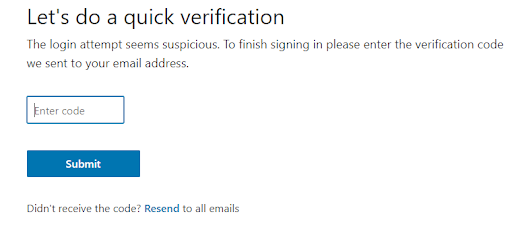
If the Two-Factor Authentication is not enabled, here’s how you can enable it.

Challenges in Testing Two-Factor Authentication
Here are some of the notable challenges in testing 2FA:
- Dependency on external services: 2FA relies on SMS gateways, email providers, and push services, which can introduce delays or failures that affect test consistency.
- Variability across devices and networks: OTP delivery and behavior differ by device model, OS version, carrier, and network strength, making issues hard to reproduce.
- Handling time-based tokens: TOTP mechanisms depend on precise time sync, and even slight clock drift between server and device can cause token failures.
- Limited automation capabilities: Steps like reading SMS codes or approving push notifications are difficult to automate without mocks or specialized setups.
- Testing negative and edge cases: Validating expired OTPs, repeated failures, slow networks, or lost-device scenarios requires controlled test environments.
- Secure handling of test data: Managing phone numbers, email inboxes, and credentials must be done securely to avoid exposing sensitive test information.
How to Test Two-Factor Authentication
The exact test cases depend on the authentication mechanisms supported by the application. However, QA teams can follow a common process.
Step 1: Identify all supported 2FA mechanisms.
Start by documenting every authentication method supported by the application.
For example:
- SMS OTP
- Email OTP
- TOTP
- Push notification
- Biometrics
- Hardware tokens
- Backup codes
Do not treat all mechanisms as one test scenario. Each has different dependencies and failure conditions.
Step 2: Prepare test accounts and test data.
Create dedicated test accounts with test data and the required authentication methods enabled.
Prepare:
- Valid and invalid credentials
- Registered and unregistered phone numbers
- Test email addresses
- Authenticator configurations
- Backup codes
- Mobile Devices with and without biometric enrollment
- Accounts with different 2FA configurations
Avoid using production credentials, real customer data, or personal phone numbers for repeatable testing.
Read More: How to select Mobile devices for testing
Step 3: Test the successful authentication flow.
Start with the expected user journey.
For example:
- Open the login page.
- Enter a valid username and password.
- Trigger the configured 2FA mechanism.
- Enter or approve the valid second factor.
- Verify that authentication succeeds.
- Confirm that the user reaches the expected authenticated state.
Repeat this process for each supported 2FA mechanism.
Step 4: Test invalid authentication attempts
Next, verify that the application rejects invalid second factors.
Test:
- Incorrect OTP
- Incorrect TOTP
- Invalid backup code
- Rejected push notification
- Failed biometric verification
- Unrecognized hardware token
Also verify that the application displays an appropriate error and does not accidentally create an authenticated session.
Step 5: Test expiration and reuse
Authentication codes should not remain valid indefinitely.
Test what happens when:
- An OTP expires.
- A TOTP window changes.
- A previously used OTP is submitted again.
- A backup code is reused.
- A newly generated OTP invalidates a previous code.
The expected behavior should match the application’s security requirements.
Step 6: Test retry limits and rate limiting.
Repeated authentication attempts should be handled according to the application’s security rules.
Test:
- Multiple incorrect OTP attempts
- Repeated resend requests
- Multiple failed biometric attempts
- Repeated login attempts
- Attempts after account lockout
- Attempts after temporary authentication restrictions
Verify that the application doesn’t allow unlimited guessing or resend requests.
Step 7: Test recovery and fallback flows
Authentication doesn’t end with the primary 2FA mechanism.
Test what happens when the user:
- Loses their phone
- Changes their phone
- Loses access to their email
- Cannot use biometrics
- Cannot receive an SMS
- Cannot access their authenticator app
- Uses a backup code
- Attempts account recovery
Recovery paths should be tested with the same attention as the primary login flow.
Step 8: Test across devices and network conditions
For mobile applications, repeat critical scenarios across supported devices and OS versions.
Test conditions such as
- Wi-Fi
- Mobile network
- Weak connectivity
- Network interruption
- App backgrounding
- Locked device
- Different device models
- Different operating system versions
- Different screen sizes
For SMS-based workflows, testing with SIM-enabled real devices can help validate incoming SMS behavior under realistic conditions.
Step 9: Test authentication state transitions
A 2FA test should also validate what happens when the user moves between application states.
For example:
- Close the application during OTP entry.
- Put the application in the background.
- Lock and unlock the device.
- Switch networks.
- Receive an incoming notification or SMS.
- Return to the application after the OTP expires.
- Restart the application during authentication.
Verify that the authentication state is preserved or invalidated according to the application’s expected behavior.
Step 10: Automate repeatable scenarios
Automate stable authentication scenarios wherever practical, while keeping external dependencies controlled.
For example, a CI test could validate:
Open the login page.

      ↓

Enter valid credentials.

      ↓

Trigger the 2FA mechanism.

      ↓

Retrieve controlled test OTP.

      ↓

Enter OTP.

      ↓

Verify authenticated state
For external services such as SMS and email, teams may use test environments, mocks, stubs, or controlled test endpoints to make automated tests reliable.
Reserve real-device and end-to-end tests for scenarios where the actual device or external service behavior is part of what you’re validating.
Read More: Continuous Testing in DevOps
Security Best Practices for 2FA Implementation
Applying strong security measures ensures that 2FA not only enhances protection but also avoids creating new vulnerabilities within authentication flows.
- Use short-lived OTPs: Limit OTP validity to a brief window (typically 30–60 seconds) to reduce the risk of intercepted or reused codes.
- Enforce rate limiting: Prevent attackers from brute-forcing OTPs by restricting the number of attempts allowed within a given time.
- Invalidate codes after one use: Ensure OTPs and backup codes cannot be reused, even if intercepted or guessed.
- Protect backup and recovery methods: Secure fallback options like email links or recovery codes, which often become the weakest link if not handled properly.
- Secure communication channels: Deliver OTPs and notifications through encrypted channels and avoid exposing sensitive data in logs.
- Implement device binding: Link authenticator apps or push-based 2FA to a specific device to prevent unauthorized enrollment or cloning.
- Monitor for suspicious activity: Track unusual login patterns, repeated OTP failures, or device changes to detect potential abuse.
- Use secure time sources for TOTP: Ensure accurate server-side time synchronization to prevent token validation errors.
- Validate on real devices: Test 2FA flows across real iOS and Android devices to confirm consistent behavior under real network conditions, device states, and OS-level variations.
BrowserStack App Live lets teams validate 2FA security measures on real iOS and Android devices, ensuring OTPs, authenticator apps, and fallback methods behave correctly under real-world conditions. It helps uncover device-specific or network-related issues that may weaken authentication flows.
2FA Testing Checklist
Use this checklist to make sure critical authentication paths are covered:
| Test area | What to validate |
|---|---|
| Login | Valid and invalid primary credentials |
| OTP generation | Code is generated correctly. successfully. |
| OTP delivery | SMS/email arrives successfully |
| OTP expiration | Expired codes are rejected. |
| OTP reuse | Previously used codes cannot be reused. |
| Resend | New codes are generated and delivered correctly. |
| Retry limits | Repeated failures trigger the expected restrictions. |
| TOTP | Valid, invalid, expired, and time-drift scenarios |
| Push authentication | Approve, reject, timeout, and notification failures |
| Biometrics | Success, failure, cancellation, and fallback |
| Backup codes | Generation, single use, invalidation, and recovery |
| Device changes | Authentication after switching or replacing devices |
| Network | Authentication under weak or interrupted connectivity |
| App state | Background, foreground, lock, and restart scenarios |
| Recovery | Lost device and inaccessible-factor scenarios |
| Session | The authentication state is created and invalidated correctly. |
| Security | Rate limits, lockouts, and suspicious attempts |
| Compatibility | Supported devices and OS versions |
The exact expected result for each test should be defined according to the application’s authentication and security requirements.
Tools & Platforms for Testing Two-Factor Authentication
Testing Two-Factor Authentication requires solutions that can handle OTP delivery, multi-device verification, network variations, and automation constraints. The following categories help teams validate both functional and security aspects of 2FA.
- Real device cloud platforms: Services like BrowserStack App Live allow testing Two-Factor Authentication flows on actual iOS and Android devices, ensuring OTP delivery, push notifications, and biometric prompts work reliably across device and OS variations.
- Email testing tools: Tools that provide test inboxes or email capture allow teams to verify OTP emails, link formatting, latency, and expiration behavior without relying on personal accounts.
- SMS testing gateways: Virtual phone numbers or SMS capture APIs help teams validate SMS OTP delivery, delays, retry limits, and formatting under controlled conditions.
- Authenticator app test environments: Tools that support TOTP setup, QR code scanning, and time sync testing help validate implementations using Google Authenticator or similar apps.
- Automation frameworks with mocking capabilities: Frameworks that allow bypassing or mocking 2FA steps in CI environments help maintain automated test coverage without exposing real credentials or OTPs.
Challenges in Testing Two-Factor Authentication
2FA testing looks straightforward on paper, but several factors make it harder to execute reliably and completely in practice.
- External service dependency: SMS, email, push, and authenticator apps rely on carriers and third-party services outside the app’s control, so delivery delays or outages can cause failures unrelated to the app itself.
- Time-sensitive codes: OTPs and TOTP codes often expire within 30–60 seconds, so automated tests must retrieve and submit them fast enough to beat expiration, adding flakiness risk.
- Limited automated access to OTPs: Reading real SMS/email codes programmatically needs extra infrastructure (SIM-enabled devices, inbox APIs, mocks), or teams fall back on hardcoded test codes that may not reflect production.
- Hardware dependency: Push, biometrics, and hardware keys rely on device sensors that emulators can’t fully replicate, pushing teams toward real-device testing.
- Test data constraints: Real phone numbers or production accounts raise privacy concerns, so testing needs dedicated sandboxed accounts, which add setup overhead.
- Platform inconsistency: Push handling, biometric prompts, and OTP autofill vary across Android/iOS versions and device makers, so a working flow on one device may fail on another.
- Hard-to-automate recovery paths: Scenarios like a lost phone or inaccessible email often need manual setup, resisting full automation.
- Security vs. testability tradeoff: Rate limits and lockouts designed to stop attackers can also block repeated automated test runs, requiring careful test-account scoping.
Also read: 21 Best Automation Testing Tools For Cloud
Conclusion
Testing two-factor authentication is not simply about confirming that a user receives an OTP and successfully logs in.
A reliable 2FA test strategy validates the entire authentication journey: successful and failed verification, OTP expiration, retry limits, TOTP timing, push notifications, biometrics, backup codes, account recovery, device changes, network interruptions, and authentication state transitions.
For QA teams, the key is to combine automated tests for repeatable authentication logic and integration scenarios with real-device testing for device- and OS-dependent behavior. This approach helps uncover failures that a basic happy-path login test can miss.
The goal is simple: ensure that every supported authentication path is secure, predictable, and usable before it reaches production.


